1 SCAN
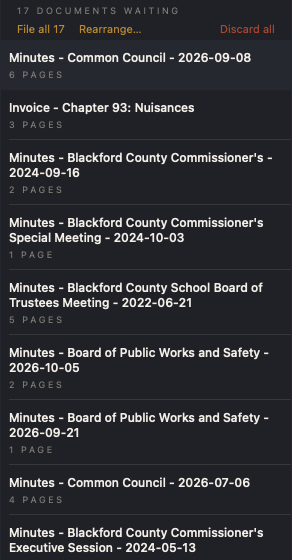
A stack goes in the feeder. Each document comes out on its own.
The unit reads every page, finds where one document ends and the next begins, turns pages the right way up, and sets blank backs aside. Nothing is typed.
A records management system for Indiana municipal offices, delivered as a sealed, locked-down unit: a small computer, a document scanner, and nothing else to manage. The records never leave the building.
The unit reads every page, finds where one document ends and the next begins, turns pages the right way up, and sets blank backs aside. Nothing is typed.
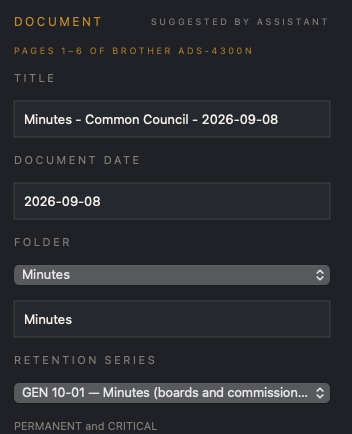
Title, document date, folder, and retention series are proposed from the pages themselves, the series taken from the Indiana Archives and Records Administration schedules. The clerk confirms with one click, or corrects any field. Nothing is filed unseen.
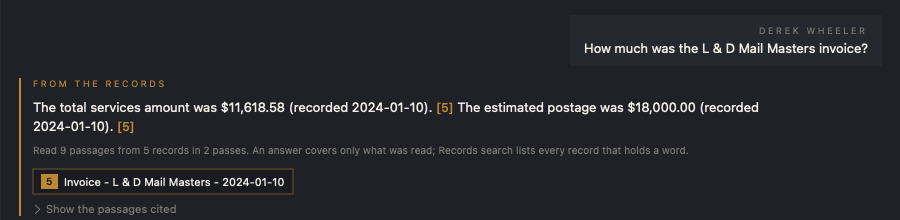
Search reads every page of every record and opens the record at the matching passage. A question in plain words is answered from the records themselves, each sentence citing the record it came from, with a note of how much was read. A citation opens the record with the passage marked.

Every record carries its retention series from the state schedules. Destruction, where a series allows it, is approved by an administrator and documented as the statute requires.
Records are released by email or copied to a drive, with redaction where a page requires it. Each release is recorded.
Every action by every user is entered in a log that cannot be edited. Filed records cannot be deleted without an administrator.
Nightly copies to a drive the office holds, with an integrity check that confirms the archive is complete.
Each person signs in with their own account and role. Filed records are locked against change on disk, the unit runs nothing but Ancilla, and no outside service ever holds a record.
Records are stored as searchable PDFs in plain folders on the unit itself, readable without our software. Reading, filing, search, and question answering all run on the unit; no record, page, or question is sent to an outside service. Nothing leaves the office unless a clerk releases it, and every release is logged.
The unit is locked down: a kiosk with no desktop, no browser, and no file system for anyone to wander, with the firewall on and the disk encrypted where the office chooses it. Filed records are write-protected on disk, so a mistake cannot overwrite them, and an audit log that cannot be edited records every action by every account.
Email sent from a unit carries the municipality's name, and replies go to the municipality's own office.
Ancilla Records is in early deployment with Indiana municipalities. To inquire about a unit for your office, write to contact@ancillarecords.com.